
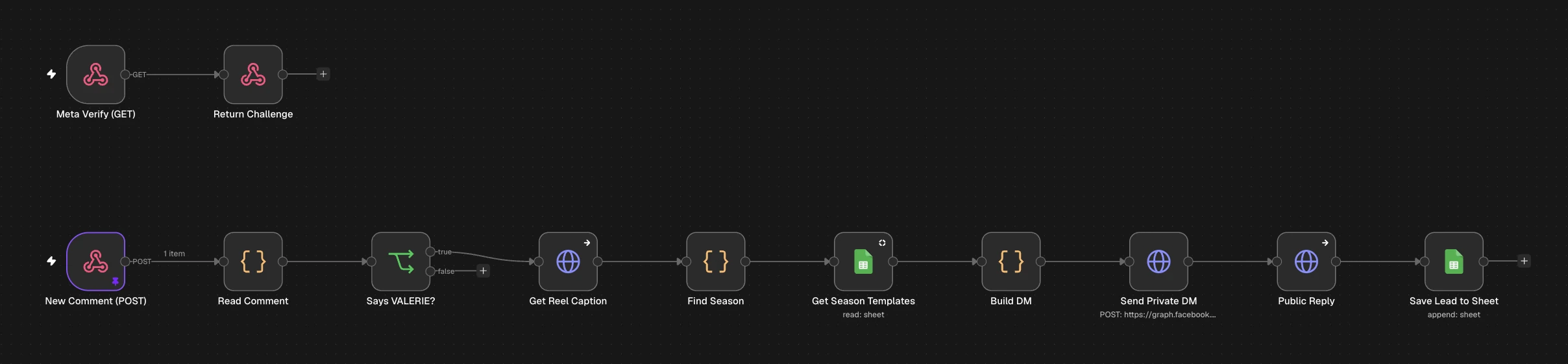
What it does
Someone comments your keyword (e.g. VALERIE) on a Reel, and within seconds:
- 📩 They get a private DM with links (all templates from that Reel's season)
- 💬 Their comment gets a public reply: "Sent! Check your DMs @user ⚡"
- 📊 They're saved as a lead in Google Sheets
Flow: Instagram comment → Meta webhook → n8n → keyword check → read the Reel caption → find the season → get links from the Sheet → DM → public reply → save lead
Why it matters: every comment becomes a conversation and a lead, and Instagram shows Reels with more comments to more people.
What you need
| Tool | Why | Cost |
|---|---|---|
| n8n | Runs the automation | Free trial / paid |
| Instagram Professional account (Business or Creator) | Required by the API | Free |
| A Facebook Page linked to that Instagram account | Required for the token | Free |
| Meta developer app | Webhooks + API access | Free |
| Google Sheets | Links + leads | Free |
⚠️ This is the most technical episode. Set aside an hour and follow the steps in order.
Import the template
- Download the template (button above)
- n8n → Workflows → Create workflow → ⋯ → Import from File
- Choose
valerie-ep03-comment-to-dm.json→ Save
You'll see two starting points:
- Meta Verify (GET): Meta uses this once to confirm the URL belongs to you
- New Comment (POST): receives every new comment
Prepare your accounts
- Switch to a Professional account (Settings → Account type)
- Link it to a Facebook Page (Instagram → Settings → Accounts Center, or Page settings → Linked accounts)
- Allow message access: Settings → Messages and story replies → Message controls → Connected tools → Allow access to messages ✅
- Without this, DMs fail
Google Sheet: two tabs
Tab TEMPLATES, with one row per episode:
Season | Episode | Title | Link
1      | 1       | Reply in 5 Seconds | yourwebsite.com/s1e1
1      | 2       | AI Lead Scoring    | yourwebsite.com/s1e2
Tab LEADS:
Username | Comment | CommentID | MediaID | Season | Sent | Time | Status
💡 Use short links. A DM has a 1,000-character limit, and short links let 8 episodes fit easily.
Meta app
- Go to developers.facebook.com → My Apps → Create App → type Business
- Add the products Instagram (choose the option that uses Facebook Login / unified login) and Webhooks
- In App settings → Basic, add a Privacy Policy URL (needed to go Live)
Access token
- Open Graph API Explorer (developers.facebook.com/tools/explorer)
- Select your app → Get User Access Token with these permissions:
instagram_basicinstagram_manage_commentsinstagram_manage_messagespages_show_listpages_read_engagementpages_manage_metadata
- Turn it into a long-lived token (Access Token Debugger → Extend), or create a system user token in Business Settings so it doesn't expire
- The token starts with
EAA…- 🔒 Never share it or show it on screen
Your Instagram account ID
In Graph API Explorer, run:
me/accounts?fields=name,instagram_business_account
Copy the instagram_business_account.id (a long number starting with 178…).
Connect the nodes
Header Auth credential (used 3 times)
Create a new Header Auth credential:
- Name:
Authorization - Value:
Bearer YOUR_TOKEN
Select it in Get Reel Caption, Send Private DM and Public Reply.
Return Challenge
Replace PASTE_YOUR_VERIFY_TOKEN (it appears twice) with any secret word you choose, e.g. mybrand_verify_2026. You'll type the same word in Meta.
Says VALERIE?
Change valerie to your keyword in lowercase. Matching ignores capitals, so "Valerie", "VALERIE" and "valerie" all work.
Get Reel Caption → Find Season
Nothing to change. These read the Reel's caption and look for "Season 1" or "S1E3" to decide which links to send.
✏️ Put "Season 1, Episode 3" (or S1E3) in every Reel caption.
Get Season Templates
- Google credential → paste your Sheet URL → tab TEMPLATES
- Make sure the filter is set: column
Season={{ $json.Season }}
Build DM
Edit the 3 lines at the top:
const KEYWORD = 'VALERIE';                    // shown in the fallback DM
const HUB_LINK = 'yourwebsite.com/templates'; // sent when no season is found
const FOOT = '\nNeed help setting it up? Just reply here ⬇️\nA new automation every day 🚀';
Send Private DM
Replace YOUR_IG_ACCOUNT_ID in the URL with your ID from step 4.5.
Save Lead to Sheet
Google credential → Sheet URL → tab LEADS.
Save → Publish. The webhook must be published before Meta can verify it.
Connect the Meta webhook
- Copy the Production URL of the webhook (both nodes share the path
valerie-ig) - Meta app → Webhooks → choose the Instagram object → Subscribe to this object
- Callback URL: your Production URL
- Verify token: your secret word
- Click Verify and save. You should see a green tick ✅
- Subscribe to the
commentsfield - Switch the app to Live (top of the app dashboard)
- In Development mode, real comments are not delivered
Test it
- From a different Instagram account, comment your keyword on a Reel whose caption contains "Season 1"
- Within a few seconds:
- ✅ A DM arrives with the season's links (check Requests if you don't follow each other)
- ✅ A public reply appears under the comment
- ✅ A new row appears in LEADS
- In n8n, open Executions to watch it run
Comments from your own account are ignored on purpose, which prevents reply loops.
Common errors
| Problem | Fix |
|---|---|
| Webhook won't verify | Publish the workflow first; use the Production URL; the verify token must match exactly |
| Nothing happens on a real comment | App must be Live; subscribe to comments; check that the Page is subscribed to your app |
| DM error: "Cannot message users" | Turn on Allow access to messages (step 4.1) |
| DM sent but no public reply | Check the instagram_manage_comments permission and the Public Reply credential |
| Fallback DM sent instead of the season links | The caption has no "Season 1" / "S1E3", or the TEMPLATES tab has no rows for that season |
| Get Season Templates returns nothing | Re-add the Season filter; the column name must be exactly Season |
Error 190 token expired | Create a long-lived or system user token |
| Second comment from the same person gets no DM | Instagram allows one private reply per comment, so this is expected |
| Red error in a node preview | Often old test data. Check the latest run under Executions. |
Customise it
- Use a different keyword per Reel ("GUIDE", "PRICE", "LINK") with a Switch node
- Send one link instead of a whole season
- Add a follow-up DM to people who reply
- Send leads to your CRM instead of Sheets
Want it done for you?
We'll connect your Instagram, write your DMs and set up your keywords for you.