
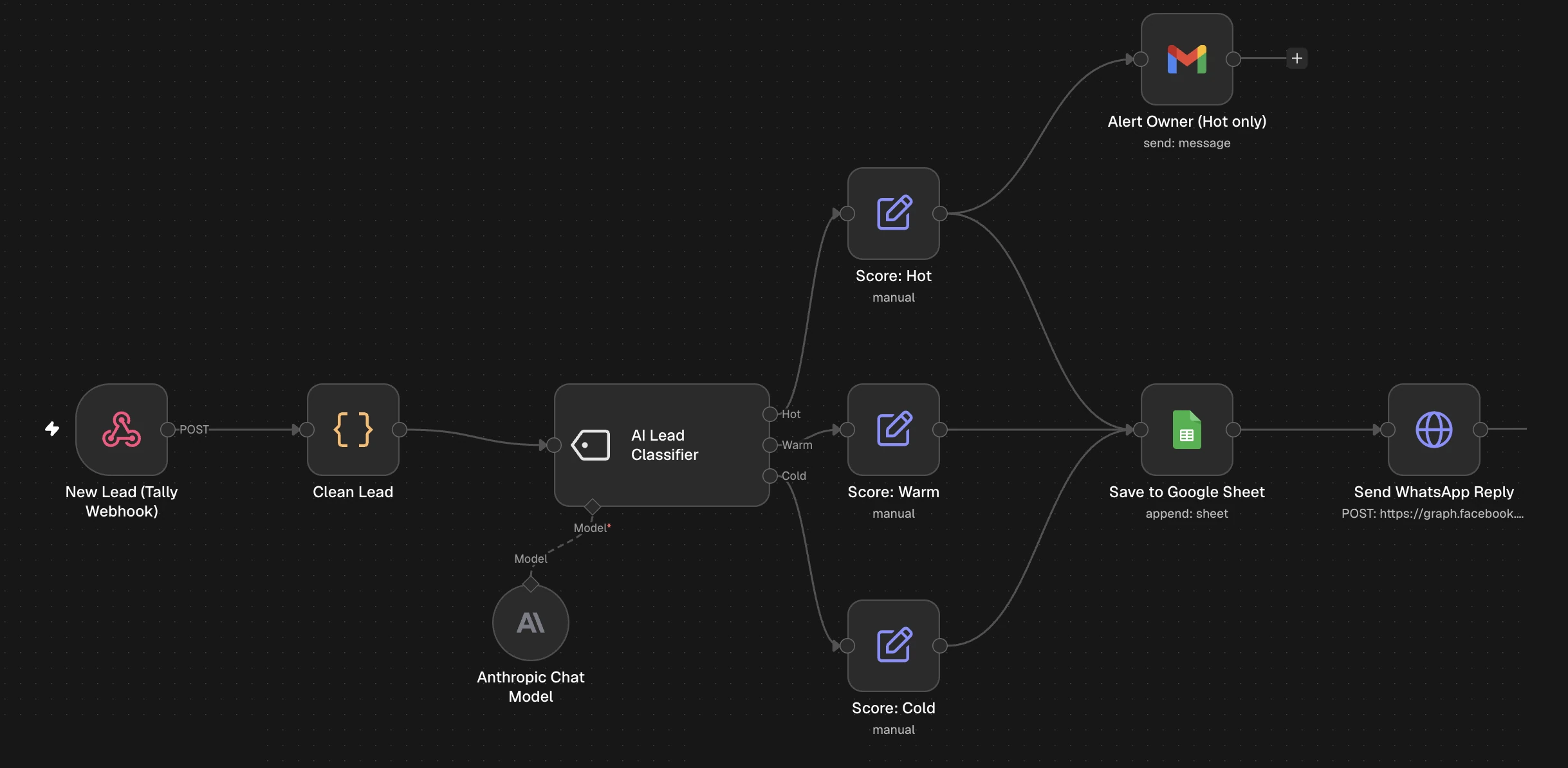
What it does
Every new lead is read by AI and sorted into:
- 🔥 Hot: ready now, so you get an email alert to call immediately
- 🌤 Warm: interested, follow up within a day
- ❄️ Cold: just exploring, nurture later
Every lead also gets a WhatsApp reply and is saved to Google Sheets with its score.
Flow: Tally → Webhook → Clean Lead → AI Lead Classifier → Score → Sheet (+ email for Hot) → WhatsApp
Why it matters: you stop wasting your best hours on cold leads and call hot ones while they're still interested.
What you need
| Tool | Why | Cost |
|---|---|---|
| n8n | Runs the automation | Free trial / paid |
| Tally | The form | Free |
| Google Sheets + Gmail | CRM + hot-lead alerts | Free |
| Anthropic (Claude) API key | The AI that scores leads | Pay-as-you-go (very low per lead with Haiku) |
| WhatsApp Cloud API | The reply | Free test number |
💡 Did Episode 1? You can reuse the same WhatsApp template (
lead_ack), token and Header Auth credential.
Import the template
- Download the template (button above)
- In n8n: Workflows → Create workflow → ⋯ → Import from File
- Choose
valerie-ep02-ai-lead-scoring.json, then Save
Prepare your accounts
Tally form
The template is set up for a loan enquiry demo. Field labels must contain:
- Name
- Phone
- Service (e.g. Home Loan, Car Loan, Personal Loan)
- Amount (e.g. "Loan amount")
- When (e.g. "When do you need it?" with options This week / This month / Just exploring)
- Message
Not a loan business? Keep the labels and change the options, e.g. "Budget" for Amount.
Google Sheet
Row 1 headers, exactly:
Name | Phone | Service | Amount | Urgency | Message | Timestamp | Status | Score
Optional: colour the Score column with Format → Conditional formatting
- Text contains
Hot→ red Warm→ yellowCold→ blue
Anthropic API key
- Go to console.anthropic.com → API Keys → Create Key
- Add a little credit under Billing
- Copy the key
- 🔒 Keep it private
Follow Episode 1, steps 4.3–4.5 (test number, permanent token, lead_ack template). If you've done them already, skip this.
Connect the nodes
New Lead (Tally Webhook)
Nothing to change. Note the Test and Production URLs.
Clean Lead
Nothing to change. It reads Name, Phone, Service, Amount, Urgency and Message and formats the phone number.
AI Lead Classifier
This is the brain. Each category has a description that tells the AI what that score means:
- Hot: needs it this week, gives a clear amount, asks for a specific product
- Warm: needs it this month or gives partial details
- Cold: no timeline, no amount, general questions
✏️ Rewrite these in your own business's words. Clearer descriptions give better scores.
Anthropic Chat Model
- Credential → Create new → Anthropic → paste your API key
- Model: choose a Claude Haiku model (fast and cheap, more than enough for scoring)
Score: Hot / Warm / Cold
Nothing to change. Each one adds a Score column (🔥 Hot / 🌤 Warm / ❄️ Cold).
Alert Owner (Hot only)
- Credential → Create new → Sign in with Google (Gmail)
- To: replace
YOUR_EMAILwith your email
Save to Google Sheet
- Google credential → paste your Sheet URL → pick the tab
Send WhatsApp Reply
- Replace
YOUR_PHONE_NUMBER_ID - Select your Header Auth credential (
Authorization=Bearer YOUR_TOKEN)
Save.
Test it with 3 demo leads
- Paste the Test URL into Tally → Integrations → Webhooks
- Click Execute workflow before each submission
- Submit these (with your own verified number):
| Lead | Service | Amount | When | Message | Expected |
|---|---|---|---|---|---|
| Rahul | Home Loan | ₹40,00,000 | This week | Need home loan for a flat, papers ready | 🔥 Hot |
| Priya | Car Loan | ₹6,00,000 | This month | Planning to buy a car next month | 🌤 Warm |
| Amit | Personal Loan | Just exploring | What are your interest rates? | ❄️ Cold |
- Check:
- ✅ The Sheet shows the right score for each lead
- ✅ Only Rahul triggers the 🔥 email
- ✅ The WhatsApp reply arrives every time
Go live
- Publish (older n8n: Active)
- Swap the Test URL in Tally for the Production URL
Common errors
| Problem | Fix |
|---|---|
| AI node error: credentials / 401 | Check the Anthropic API key and make sure you have credit |
| Model not found | Pick a model from the dropdown instead of typing one |
| Every lead gets the same score | Make the category descriptions more specific and different from each other |
| No hot-lead email | Reconnect Gmail, check spam, make sure the lead scored Hot |
| Score column empty | The header must be exactly Score |
| WhatsApp errors (131030, 132001, 190) | See the Episode 1 error table |
Customise it
- Change the categories (e.g. Buyer / Renter / Spam)
- Send different WhatsApp templates per score
- Send hot leads to Slack or Telegram as well as email
- Swap Claude for another AI model in the Chat Model slot
Want it done for you?
We'll tune the AI scoring to your business and set everything up for you.